
What do wholesale volume discounts on Shopify actually require?
On this check, 12 November 2026, I opened the live listing for OO ‑ B2B & Wholesale, the articles How quantity breaks work and Set up volume pricing, the module map What is included, and Shopify Help on discount types. Help already lets you discount at a given order volume, and it sends tiered rules and custom eligibility to a discount app or, on Plus, to Checkout Blocks. The app articles describe the Volume pricing screens. This page is the filter in front of those screens: when a product-page break is the requirement, which plan unlocks it, and when a plain Shopify discount is the cleaner tool. Re-open the pages if volume pricing leaves Starter, if the listing drops the four layouts, or if Help starts covering tag and company breaks itself.
The requirement, stated as a buyer would
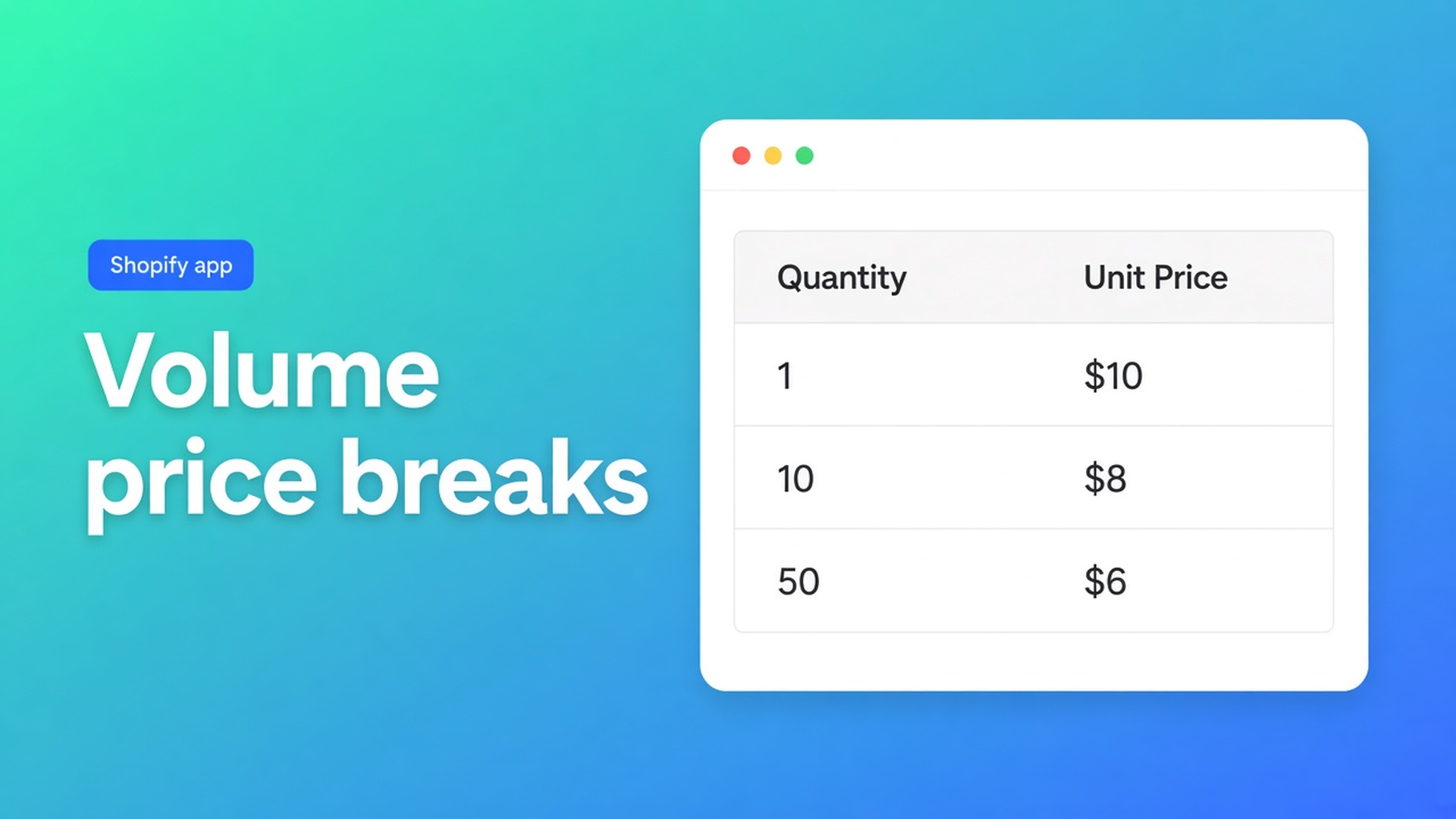
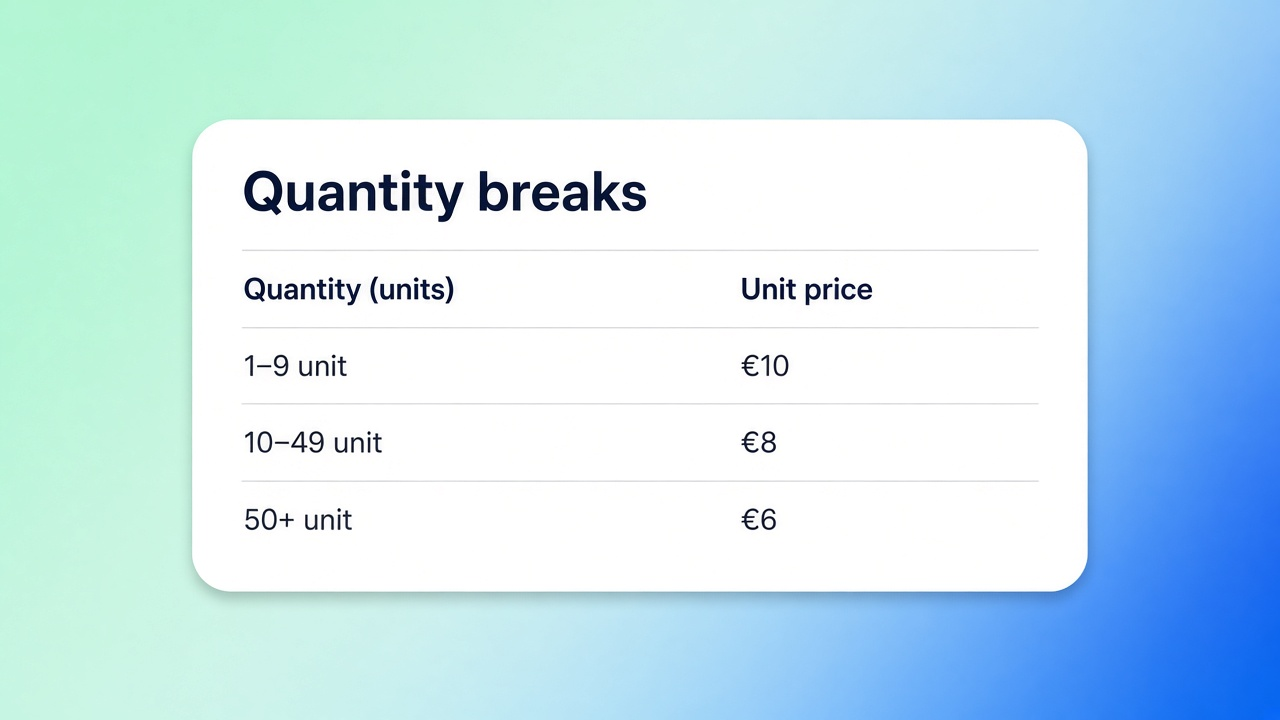
A wholesale buyer wants the unit price to fall as the quantity rises, and they want to see that before checkout. The docs, both updated 13 October 2026, use the ranges 1–9, 10–49, and 50+. Default minimums start at 1, 10, and 50. You can change them.
Each tier is a minimum quantity plus a price. Fixed means that unit price from the minimum upward. Percent off means a percentage off the unit price, with rounding if the form has it. A variant can carry its own override when the catalog price should not follow the form default.
Who sees it is a separate switch: everyone, or only tags, specific customers, or companies. People outside the rule do not see the breaks. The layout is a table, a segment (a compact row of quantity chips), offer cards, or a timeline. The listing hero names the same four: table, chips, offer cards, or timeline. The docs call the chip layout “segment”. Treat those as one feature, not two.
The shared app embed has to be on for the active theme. The form status has to be On. The product has to be in the selection. Then add the quantity and check the cart. A pretty table with a different unit price in the cart has failed the article’s own test.
Volume pricing does not replace a company price list or a bulk order form. That sentence is in the quantity-breaks article. A fixed price for one company, regardless of quantity, stays on the price list. A grid where the buyer types twenty SKUs at once is a bulk form, and the module map puts bulk forms on Growth. The bulk-form note is that other module. Quantity breaks alone do not need it.
Help versus the module
Requirement | Shopify Help, discount types, 12 November 2026 | Volume pricing in this app |
|---|---|---|
A discount once the order hits a volume | Amount off can do that, on a product, a collection, or the order | Unit price by tier, shown on the product page |
Only a tag or a company sees it | Tiered and custom eligibility point to an app, or Checkout Blocks on Plus | Tags, customers, or companies on the form |
Table, chips, cards, or a timeline | Not described on this Help page | Those four layouts |
Plan | The discount lives in Shopify | Starter or Growth. Free does not include it |
Replaces a company price list | No | No. The docs keep them apart |
Cart matches the tier you showed | A discount calculates at the end | The setup article tells you to check the cart |
Stay in Shopify when one automatic “10% from 10 units” for every visitor is the whole request. Move to the app when the break is visible only to a wholesale tag, a variant needs its own tier, or the buyer has to see the ladder on the product page rather than a discount line in the cart.
Free on the listing is still one custom pricing rule and one registration form, plus approve or reject, and Flow templates for that one form. Development stores have no caps. If the Volume pricing card is locked, the setup article says the store needs Starter or higher. Starter on the listing is $22 a month or $220 a year, with a 14-day trial, and it includes unlimited volume pricing. Growth is $37 or $370 a year, also with a 14-day trial, and adds bulk forms, quotes, order limits, and the wholesale cart. You do not need Growth just to show a ladder.
A case of bottles, and who is allowed to see it
A winery sells the same bottle by the unit, by the case of twelve, and by the fifty. The default steps in the docs are a starting point, not a law: change 10 and 50 to 12 and 48 if that is the pack. The trade account with the tag sees the table. The guest sees the shelf price, because the visibility rule excludes them.
That is not a registration form. Approving a new account is the 9 November checklist. A tag in a visibility field does not, by itself, write the tag onto the customer. Do not treat the ladder as an onboarding flow.
Labels can change per language: heading, column names, and the savings text. The setup article puts that under volume pricing translations. The listing’s language row still says English, and the hero does not claim a translated admin. How the rest of the EU wording works is the 11 November piece, not this requirement.
Companies on Plus are a different argument. The 4 November piece holds that comparison. A Starter ladder is not a substitute for that conversation, and a company catalog is not a product-page table.
What else the listing showed
Prices match 11 November. Built for Shopify. 5.0 from 34 reviews: 33 fives and one four. The three cards on screen were 6 October, Sensorkranenwinkel.nl (about 2 years), 11 June, POPlab Sounds (5 months), and 21 April, Rohleder AT (about 2 hours). The four-star text was not on those cards. Launched 9 February 2024. Works with Checkout, Shopify Flow, and Shopify Admin.
Resources on this fetch: the privacy policy only. No App Documentation row. I opened the docs URLs directly. Data access includes customers, companies, the theme, orders (60 days and draft orders), discounts, locales, locations, and Markets.
The module map says a theme change does not delete the configuration inside the app. You do add the embed again on the new theme. Volume pricing shares that embed with Custom Pricing, tax display, login to see prices, and order limits.
The bill as the account list grows is the pricing note. Which URL may tie a module to a plan is the sources note.
Primary sources
Listing: OO ‑ B2B & Wholesale, read 12 November 2026
How quantity breaks work, updated 13 October 2026
Set up volume pricing, updated 13 October 2026
What is included in B2B & Wholesale, updated 13 October 2026
Shopify Help: Discount types
On this site
The bulk form, a different module: the 8 November note. Registration with approval: the 9 November checklist. Price at scale: the 7 November note. The app index is apps. Shopify apps as a service: apps and integrations.
What would change this
On 12 November 2026, wholesale volume discounts in this app are the requirement when the unit price moves with quantity, the buyer sees that on the product page, and not every visitor should see the ladder. That starts on Starter at $22 a month or $220 a year, not on Free. It does not replace a company price list or a bulk form. One volume discount for everyone can stay in Shopify. If the module map or the listing layouts change, this page changes with them. Install from OO ‑ B2B & Wholesale, then check the tier in the cart, not only on the product page.
This blog is presented to you by

Floris-jan de Vries
Co-owner / Back-end developer / Shopify Expert
As a full-stack developer, Floris-Jan ensures the technical logic behind the design. He also uses his extensive knowledge of Shopify every day to provide our clients with the best possible support.


The Shopify Select partner for ambitious e-commerce businesses that want to grow!

Services
Reviews
5/5
Mail: info@onlineorigins.nl
Tel: 073 234 0612
KVK: 89825624
BTW: NL865123639B01
Bruistensingel 500,5232 AH 's-Hertogenbosch Cookies
© 2026 Online Origins