
Shopify table custom attribute types: text is not weight
Warranty is not a Shopify standard field. Weight is. An AI draft still pastes both as static copy. Shopify table custom attribute value types is the next click: text, measurement, number, boolean or link — and when you must not pick any of them because Weight or Price already has a Shopify module. Checked 7 November 2026: OO - Advanced Table Builder listing, What is Tables, Specs & Comparisons?, Quick start, Create and refine with AI, Shopify Help Metafields. If the type list or the “map Weight/Price/Color to Shopify modules” tip changes, re-read those sources before you store warranty as `number`.
When to use a metafield versus a custom attribute at all is the metafields post. This one is only the value type.
Shopify already has types. A description table does not
Metafields include integer, decimal, boolean, URL, measurement. Liquid can print them. Native Shopify will not lay those types out as a specs grid next to Add to cart, with groups and translations. An HTML table in the description is a string. “2 years” and “24 months” look the same there.
Docs: Product Specs = live Shopify fields and custom attributes for the current product. Quick start: *Prefer Shopify-backed modules (Weight, Price, options, metafields) when values should stay live.* Custom attributes are the remainder: warranty copy, a material blend, a manual URL — not Weight.
Until merchants split those they usually:
Park everything on text. “1.2 kg” as custom text. New shipment, new variant weight — the table still says 1.2. Empty value will not save you: the cell is not empty, it is stale.
Store a boolean as the word “yes”. Icons, translations, comparison rows then fight three strings. Boolean is yes/no. Text is copy.
Ship the screenshot draft. Generate with AI: after create, walk module types so Weight / Price / Color are Shopify modules, not custom attributes. Listing 7 Nov 2026: Free, 5.0 from 1 review. AI is a draft.
Five types — and the rows that must not use them
Docs and Structure guides list custom-attribute types as text, measurement, number, boolean, link. Do not invent a sixth.
Type | Use it for | Do not use it for | Checked 7 Nov 2026 |
|---|---|---|---|
text | Warranty copy, material description | Weight that lives on the variant | Shopify module Weight |
measurement | A dimension with no Shopify source, e.g. “cut face 18 mm” storefront-only | EU/US size charts — that is a Size chart table, not a specs cell | |
number | A unit-less figure that exists nowhere in Shopify | Price | Shopify module Price |
boolean | Waterproof yes/no, dimmable yes/no | “Yes, IP65” as marketing copy | Split boolean + text, or stay on text |
link | PDF manual, datasheet | A colour swatch | Color → Shopify module |
Caption: types from app docs; Weight/Price/Color mapping from the AI article. Listing Free. If the builder adds or drops a type, this table is wrong.
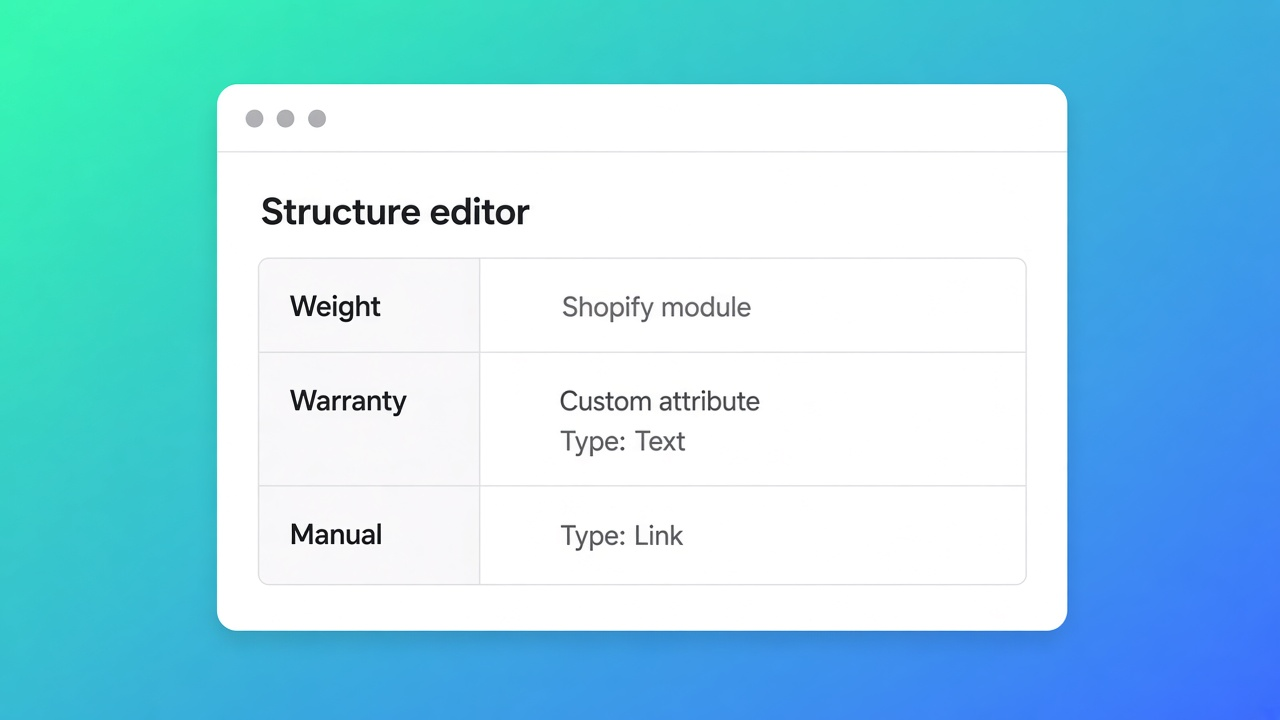
Groups and modules stay the skeleton: group Service, then warranty (text) and datasheet (link). A group is not a type.
Specs still need a theme app block. No Add to cart auto-inject, regardless of type.
Why the type shows up in Comparison
Comparison fills each cell from the selected product (FAQ): Shopify data and custom attributes where configured. A boolean “dimmable” compares cleanly. The same claim as text “yes, app” versus “Yes (app)” is noise in the matrix.
Per-variant specs belong on a variant metafield, owner variant. A product-level custom attribute does not change when the shopper picks a colour. That is the wrong owner, not a boolean bug.
Empty-value policy (hide vs “Not available”) applies to empty Shopify modules. Custom text “n/a” is not an empty value — we already wrote that. Pick a type or pick a policy, not both on one row.
Worked example: pendant light, warranty text, IP boolean, live weight
Store “Canopy Light”. Three variants, three weights. Five-year warranty on all. IP44 yes/no per SKU — that is a metafield if you already store it, not a custom attribute. One PDF manual.
Install OO - Advanced Table Builder. Listing Free (7 Nov 2026).
Table type Product Specs. Structure: group Tech → Shopify module Weight. Group Certification → metafield IP44 (boolean in Shopify) if the data lives there; custom boolean only if it does not.
Group Service → custom attribute Warranty, type text. Custom attribute Manual, type link.
No custom measurement for weight. If AI pasted an old HTML table, remap Weight to the Shopify module.
Product specs theme block on the product template. Enable. Variant switch: kg moves, warranty copy does not. Comparison row for IP: boolean, not a “yes” string.
Shade colour: Shopify module / option, not custom text “black”. Docs: Color maps to a Shopify module.
Get the types live without restyling first
Open Structure. No Shopify source → pick the type the cell actually is. Has a Shopify source → module, not custom. Quick start: live values → Weight, Price, options, metafields.
After Generate with AI: same pass. A competitor screenshot is allowed; the mapping afterwards is yours. Specs stay a theme block. Custom CSS and icons style the cell. They do not change the type.
The listing is Free until the card changes. Do not invent a Premium tier.
Bottom line
For Canopy Light I would keep Weight as a module, warranty as text, IP as a metafield boolean, and the manual as a link — not four text rows because the draft said so. Shopify table custom attribute value types are five choices for data Shopify does not hold. Weight, price and colour belong on modules so the table follows the product. Listing 7 Nov 2026: Free, 5.0 from 1 review. Docs: live first, custom for the rest. If the type list moves, this advice is wrong.
Add the row from the OO - Advanced Table Builder listing and switch one variant to see what is live and what is copy.
This blog is presented to you by

Floris-jan de Vries
Co-owner / Back-end developer / Shopify Expert
As a full-stack developer, Floris-Jan ensures the technical logic behind the design. He also uses his extensive knowledge of Shopify every day to provide our clients with the best possible support.


The Shopify Select partner for ambitious e-commerce businesses that want to grow!

Services
Reviews
5/5
Mail: info@onlineorigins.nl
Tel: 073 234 0612
KVK: 89825624
BTW: NL865123639B01
Bruistensingel 500,5232 AH 's-Hertogenbosch Cookies
© 2026 Online Origins