
Can a shopper edit a Shopify calculator price in the browser?
A countertop shop quotes width times depth while the buyer is still on the product page. The page says $420. Checkout says $42. Nobody changed the formula. Somebody changed the number the browser posted. On 11 November 2026 I opened the live listing for Options Price Calculator, the article Server-side price validation, and Plans and usage limits. The same morning I opened Shopify Help on adding variants. The validation page says it was last updated 6 months ago. The plans page says about 16 hours ago.
Help is a variant ceiling. These docs are a switch. Help, reread this morning, still caps a product at three options and 2,048 variants, and it points past that ceiling to an app or to line item properties. Properties annotate a line. They do not price it. The safety article adds the part Help never has: the check exists, and a shop that has never saved it is still trusting the posted amount. Re-open both pages if the default flips to on, if the listing drops the bullet, or if Free, Premium, or Ultimate changes price.
What knocks a calculator out
A sentence in the hero is not the same object as a rejected cart line. Miss one row and the app does not win on a 5.0 or on a cheaper card.
Must-have | What fails the test |
|---|---|
The amount is checked off the browser | A live formula on the product page is a display |
Someone saved the switch after install | Off is the documented start, not a forgotten footnote |
A bad signature never expands into the order | “The control exists” is not “the line is refused” |
The storefront cannot turn the check off | A property that disables it is another hole |
The plan matches the order volume | The Free card is one line, 20 uses |
You quote 3 options and 2,048 variants | Help on 11 November 2026 still does not say 100 |
Conditional formulas, lookup tables, and file uploads are Premium at $19.99. Show/hide and draft orders are Ultimate at $39.99. The safety article does not park the switch on either card.
Off, then on
Every calculator page writes the amount to `__ooCustomPrice`. The cart bundle and the draft-order flow can trust that property, or they can verify it.
Off is the default. The bundle and the draft order take `__ooCustomPrice` as the unit price. No signature. Setup is shorter. The article states the risk in plain words: a technical visitor can edit the price with browser tools before it is submitted, and that edited price lands on the order. New shops are in that state. So is any shop that has never opened Theme settings and pressed Save.
On, each line is expected to carry `__ooLiteSig`, `__ooPayloadHash`, and `__ooQuotedPrice`. The cart bundle recomputes the signature with the shop’s pricing keys and rejects the line if the signature is wrong or the price changed. The draft-order proxy runs the same check. Failure means no expand for that line. You do not copy or rotate the keys by hand.
The switch is global. It covers every calculator and every product page. No storefront property can disable it. The article’s recommendation is to turn it on after the formula has been tested end to end, and to leave it off only when you accept the trade-off.
The steps on that page: open the app, Settings, Price settings, tick *Enable server-side price validation (safety feature)*, Save. The dashboard calls the same step Safety rules. A second sentence places the control on the global Theme settings page under Price settings, next to showing currency. Both sentences agree on the action that matters: Save, or the shop stays off.
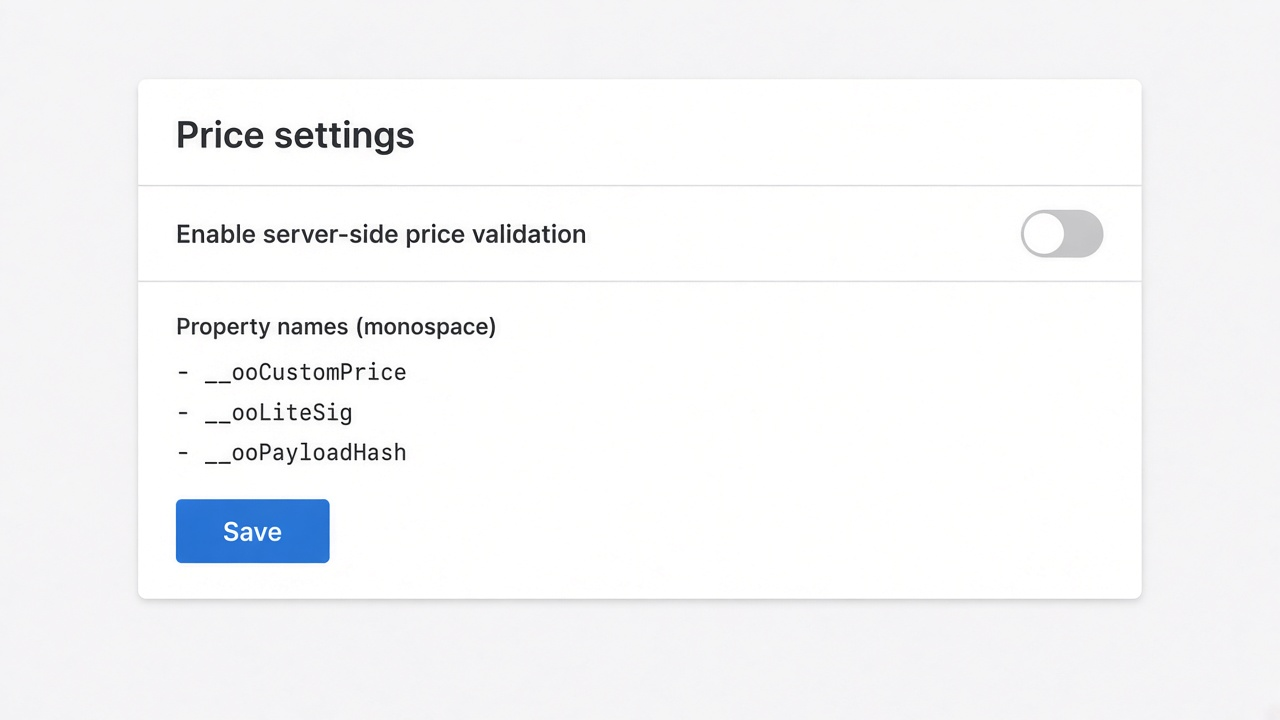
That figure is a diagram of the documented control, not a capture from a merchant admin. The switch is off because that is the start state the article describes.
What the listing says, and what the plans page still prices
Same morning, live listing: Built for Shopify, 5.0 from 30 reviews, every one of them five stars. The three cards on screen are still 30 October 2026 Orange Shapes (Netherlands), 29 October Brooklyn Butcher Blocks (United States), and 23 October Kingdom Decals (United Kingdom). The text of review 30 was not on this screen. Listing language: English. Works with Checkout. Launched 15 August 2025. Resources showed the privacy policy and App Documentation. Data access includes cart transforms and cart and checkout validations, plus locales and Markets. That matches a cart bundle. It does not mean the switch is on.
The description names secure server-side price validation to prevent price manipulation. The phrase sits in the hero, not on a single price card. Cards this morning:
Plan | Listing price | What the card lists |
|---|---|---|
Free | $0 | Only “Ultimate Plan for Free – 20 uses limit” |
Starter | $9.99 / month | Unlimited options, AI, formula builder, metafields, styling, multilingual |
Premium | $19.99 / month | Starter, plus conditional pricing, font picker, live preview, price breakdown, lookups and uploads |
Ultimate | $39.99 / month | Premium, plus show/hide, draft-order checkout, admin calculator, setup |
No yearly price and no trial on these cards. Charges are in USD, every 30 days.
The plans article, which says it was updated about 16 hours ago, now names Free, Starter, Premium, and Ultimate. That is newer than the two-month-old version that skipped the fourth tier. The “typical” USD figures in the article are still about $0, $9.99, and $14.99 for Premium. Ultimate “may appear” and unlocks uploads up to 500 MB. Free in that article is one calculator, 20 calculated orders for the life of Free, and one AI use. The listing’s Free card does not print those three limits. It prints 20 uses and the phrase “Ultimate Plan for Free.” That phrase is not a feature list of show/hide or draft orders. Do not promise Ultimate tooling on Free while the card stays this short and the article still prices Premium near $14.99.
The formula builder, still marked about two months ago, keeps lookup tables, conditional if/then, and the calculation display on Premium. The main formula, metafields, and rounding helpers are not given that label there. A shop can be on Starter, with a working formula, and still have the safety switch off. The page looks priced. The order trusts the browser.
When variants are the whole product
Stay native when the product is three options, a fixed price per SKU, and stock per combination. Help on 11 November 2026: up to three options, up to 2,048 variants, up to 250 media, and a warning that some themes and apps stumble above 100 variants. Help itself says that going past 2,048 variants or past three options means an App Store app or theme code that reads line item properties. Properties are a note. They are not a price.
A calculator starts when the price is an expression of what the shopper typed. It starts protecting that price only after the switch is saved. Until then you have a product page and a trusted post.
The option ceiling is a separate checklist. This page is the signature.
What was open this morning
Options Price Calculator listing: cards, reviews, data access.
Server-side price validation, page says 6 months ago.
Plans and usage limits, page says about 16 hours ago.
Formula builder, page says about 2 months ago.
On this site
The bill as volume grows is the cost-at-scale note. The Ex comparison, including the Free cap, is the 10 November piece. The theme app extension is the Built for Shopify note. Which URL is allowed to carry a claim is the sources note. The app page on this site is Options Price Calculator. Shopify apps as a service: apps and integrations.
What still holds on 11 November 2026
The listing names a server-side check. The docs describe that check, and they describe it as off. A Starter formula for a countertop is not, by itself, an enforced order price. Turn the switch on after an end-to-end test, and do not quote the plans article as the price: Premium on the listing is $19.99, and the article still says about $14.99. Install from this listing when the signature is the knockout: Options Price Calculator. Drop the conclusion if the default becomes on, or if those two Premium figures finally match.
This blog is presented to you by

Floris-jan de Vries
Co-owner / Back-end developer / Shopify Expert
As a full-stack developer, Floris-Jan ensures the technical logic behind the design. He also uses his extensive knowledge of Shopify every day to provide our clients with the best possible support.


The Shopify Select partner for ambitious e-commerce businesses that want to grow!

Services
Reviews
5/5
Mail: info@onlineorigins.nl
Tel: 073 234 0612
KVK: 89825624
BTW: NL865123639B01
Bruistensingel 500,5232 AH 's-Hertogenbosch Cookies
© 2026 Online Origins