Checkout Extension Tutorial
Adding the EU VAT Validation Extension to Your Checkout Page
To enable VAT number validation in the checkout, you need to customize the Checkout page of your Shopify store using Checkout UI extensions. Follow these steps to set it up:
In your Shopify admin, go to Settings → Checkout
Under the Configurations section, click Customize next to the profile you want to edit
In the checkout editor, click Add app block and select EU VAT Validation
Check the Allow app to block checkout option to ensure VAT numbers are validated before checkout completion
Click Save to apply the changes and enable the VAT number field on the Checkout page
This integration ensures that VAT-exempt customers can enter their VAT number during checkout, and the system will verify its validity before processing the order.
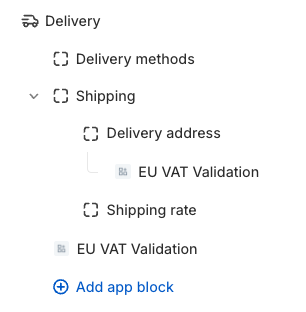
One-page checkout layout
Place the app block in the Delivery section, inside Delivery address.
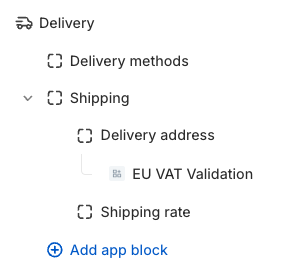
Three-pages checkout layout
place the app block on the Information page in the Contact section, inside Shipping address.
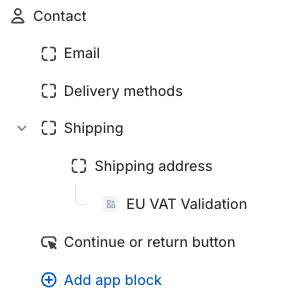
Selling digital goods
If your store sells digital products or a mix of digital and physical goods, customers purchasing only digital items will not see the shipping details form at checkout. Instead, they will only be required to enter their billing information.
To ensure that all customers have access to the VAT number field, add an additional EU VAT Validation app block to the checkout navigation.
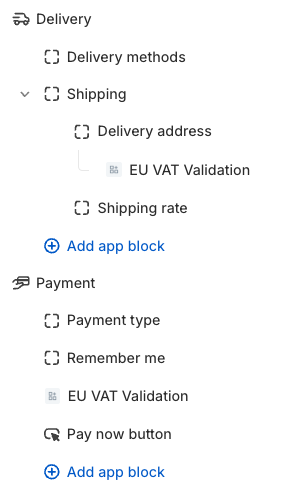
One page checkout - Digital goods
Add the second app block in the Payment section, just below the Remember me block.
Three pages checkout - Digital goods
Add the second app block in the Contact section, just below the Shipping group.