
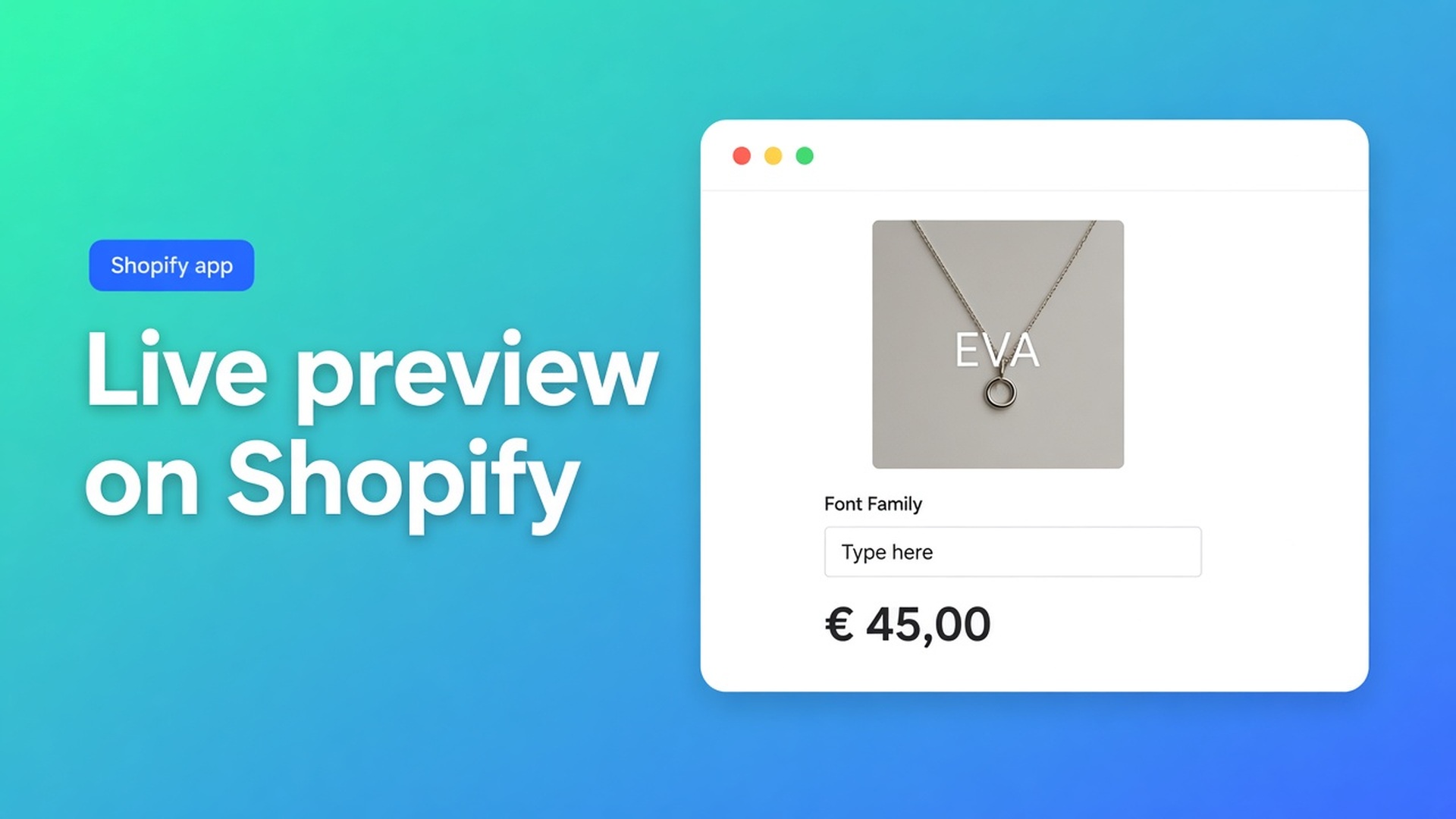
Shopify product personalizer live preview: show custom text on the photo
A necklace with initials, a mug with a name, a phone case with a logo: the shopper is not buying “medium”, they are buying *their* text. Anyone who wants a Shopify product personalizer live preview hits the same wall. Native variants cannot store open-ended copy as a SKU, and a theme input with no overlay leaves people guessing how “Emma” will sit on the metal.
This article covers why a grid of sample names fails, how to put text, typeface and colour on the product photo, and how Options Price Calculator does that as Product Personalizer – Live Preview (Premium) with a live price — without a variant per phrase.
We already covered engraving and personalization upcharges. That post was about the fee. This one is about seeing it: type on the photo, the same image in the cart, and fulfillment that does not have to guess.
Why Shopify is not a personalizer
Shopify variants are stocked combinations. Adding variants caps a product at three options (Colour, Material, Size) and 2048 variants. The old 100-variant cap is gone; the three-option cap is not. Extra cells in the matrix do not give you free text, a font picker, or a live overlay on the product photo.
Theme line item properties (`properties[Text]`) store the input on the line, but they do not change the price and they do not draw the text on the media. The shopper types “Emma”, still sees the blank product shot, and still pays the static variant price.
What native *can* do: metal, chain length or case size as real SKUs. Engraving copy does not belong there.
What merchants try instead
1. Sample names as variants
“Anna”, “Emma”, “Noah” as option values. That will not blow the 2048 ceiling on day one, but it is not personalisation. Anyone who needs “Sofía” or a company name emails you. The photo stays a stock shot.
2. A theme input only
A Liquid field under Add to cart. The line has text, the cart shows the default thumbnail, the price never moves. Returns follow: “that is not what I thought I ordered”.
3. A mockup tool outside checkout
The shopper designs in another tab, emails a PNG, you raise a draft order. No live price, no `__ooCustomImageUrl` on the line.
None of those routes give you type on the photo as they type, a font that enters the formula, and the same preview in the cart drawer.
How Options Price Calculator handles this
Options Price Calculator is Built for Shopify (5.0 from 25 reviews on the listing). The listing calls out live preview for personalized products with custom product options, plus unlimited options and formula pricing. Starter $9.99/month: unlimited options, formula builder, metafields, multilingual, AI generation. Premium $14.99/month: + conditional logic, Font Picker, Product Personalizer – Live Preview, real-time price breakdown. Free: 20 uses; always free on a Shopify Develop plan. Billed in USD.
Live preview is not a Free or Starter feature. Do not describe it that way on the product page.
Customizer: preview on the product photo
Docs call the add-on the Customizer. It mounts the live preview over your theme’s product image. That needs Storefront Theme Bindings: Product image selectors aimed at the media area. Only required if you use the Customizer or want the product image to react to calculator selections.
Do not hand-write those selectors if you can avoid it. The Selector Picker has Pick product image on storefront: a window opens on your product page, you click the photo, the app writes the CSS selector. After a theme switch, re-run all three pickers (price, Add to cart, product image).
The Customizer can generate a per-order personalised image. That URL lands on the line item property `__ooCustomImageUrl`. Cart line item image selectors then replace the default thumbnail in the cart and cart drawer with that preview.
Fields: Font Picker, or text plus file upload
For engraving, signage or print, the Font Picker (Premium) is the right block. It is one composite field:
A dropdown for the typeface (built-in picker, Google Fonts).
Free-form text — default label “Text to engrave”, translatable.
Optional colour: a curated list, a free picker, or both.
Each control can move the price. Font options have a Label, a Font and a numeric Value: `0` for free fonts, `5` for licensed ones. Turn Required field on if you refuse a blank engraving: font, text and (if shown) colour must be complete before Add to cart.
No typeface choice? Use a Text Field (`text_input`, lowercase key). Numeric value of `5` means empty = `0` in the formula, any typed text = 5.
Formula: flat fee plus per character
The Formula Builder allows `+ - × ÷ ( )`. `product_price` is the selected variant — here the base goods (necklace, mug, case).
The Font Picker appears in the Form fields dropdown with friendly names: Font option value, Number of characters, Font color option value. Behind the scenes, `{key}_chars` is the character count on a Text Field, Textarea or Font Picker; `{key}_color` is the numeric value of the chosen colour.
Simple: base plus an engraving fee once any text is present (Text Field numeric value `12`):
``` product_price + engraving ```
Per character plus a font surcharge (Font Picker key `text`):
``` product_price + text_chars * 0.35 + text ```
Here `text` is the font option value. A computed property such as “Engraving total” keeps the main formula short, as the font docs suggest. Round at the end: `Math.round(...)`.
Min/max length, or a higher rate past 20 characters, is Premium conditional — not Free/Starter. `{key}_optidx` (zero-based index of the font or colour) exists only inside those rules.
Example: silver pendant with initials
Keep real SKUs native: metal (silver / gilt) and chain length (40 / 45 / 50 cm). That uses two of your three options. No “Text” option.
Calculator on Premium:
Font Picker `text`, required, two fonts (Script = 0, Slab = 4)
Optional colour list: black = 0, rose = 3
Formula `product_price + text_chars * 0.40 + text + text_color`
The shopper picks gilt 45 cm (variant $48), types “EVA” (3 characters), chooses Slab and rose: `48 + 1.20 + 4 + 3 = 56.20`. Live on the page, the same total in checkout. The Customizer lays “EVA” in Slab over the pendant photo. In the cart drawer, `__ooCustomImageUrl` replaces the stock thumbnail.
Link the calculator with Linking Products & Variants. One calculator for the whole jewellery line is enough if only `product_price` changes. A mug instead of a pendant may need a second calculator if the overlay position is wrong.
Multilingual (Starter+): translate Font Picker labels in the Translations tab. The formula stays the same.
What you need to start
Install Options Price Calculator. Free: 20 uses (always free on Develop). Starter $9.99/month for fields and formulas. Premium $14.99/month for the Font Picker and Product Personalizer – Live Preview.
Drop the app block on the product template, below the price and above Add to cart — How to Add the Extension to the Product Page.
In App settings: paste a product URL, then Pick product image (and price + ATC). Add cart thumbnail selectors if you want the personalised image in the drawer.
Build the Font Picker or text field. Link the calculator to the variants. Keep metal and size as Shopify variants; keep copy out of the matrix.
Test: type “EVA”, switch font and colour, check the overlay, the live price, the cart image and the order line.
Server-side price validation (app setting) stops the browser-only price from being trusted. Theme bindings exist because themes differ — this is not “works on every theme with zero setup”.
Wrap-up
A Shopify product personalizer live preview is not a variant per name. It is text, typeface and colour on the product photo, a formula that prices those choices, and the same preview in the cart. Native Shopify stops at three options and 2048 variants; free text on the media belongs in the Customizer.
Put the Font Picker and live preview in Options Price Calculator (Premium) and let the next shopper see “EVA” before Add to cart — not only on the packing slip.
This blog is presented to you by

Floris-jan de Vries
Co-owner / Back-end developer / Shopify Expert
As a full-stack developer, Floris-Jan ensures the technical logic behind the design. He also uses his extensive knowledge of Shopify every day to provide our clients with the best possible support.


The Shopify Select partner for ambitious e-commerce businesses that want to grow!

Services
Reviews
5/5
Mail: info@onlineorigins.nl
Tel: 073 234 0612
KVK: 89825624
BTW: NL865123639B01
Bruistensingel 500,5232 AH 's-Hertogenbosch Cookies
© 2026 Online Origins